Generate self-signed certificates, batch sign Windows executables, and export CI/CD pipelines. Free & Pro tiers for developers. Download Code Signing Toolkit today.

🚀 Streamline Your Software Signing Workflow
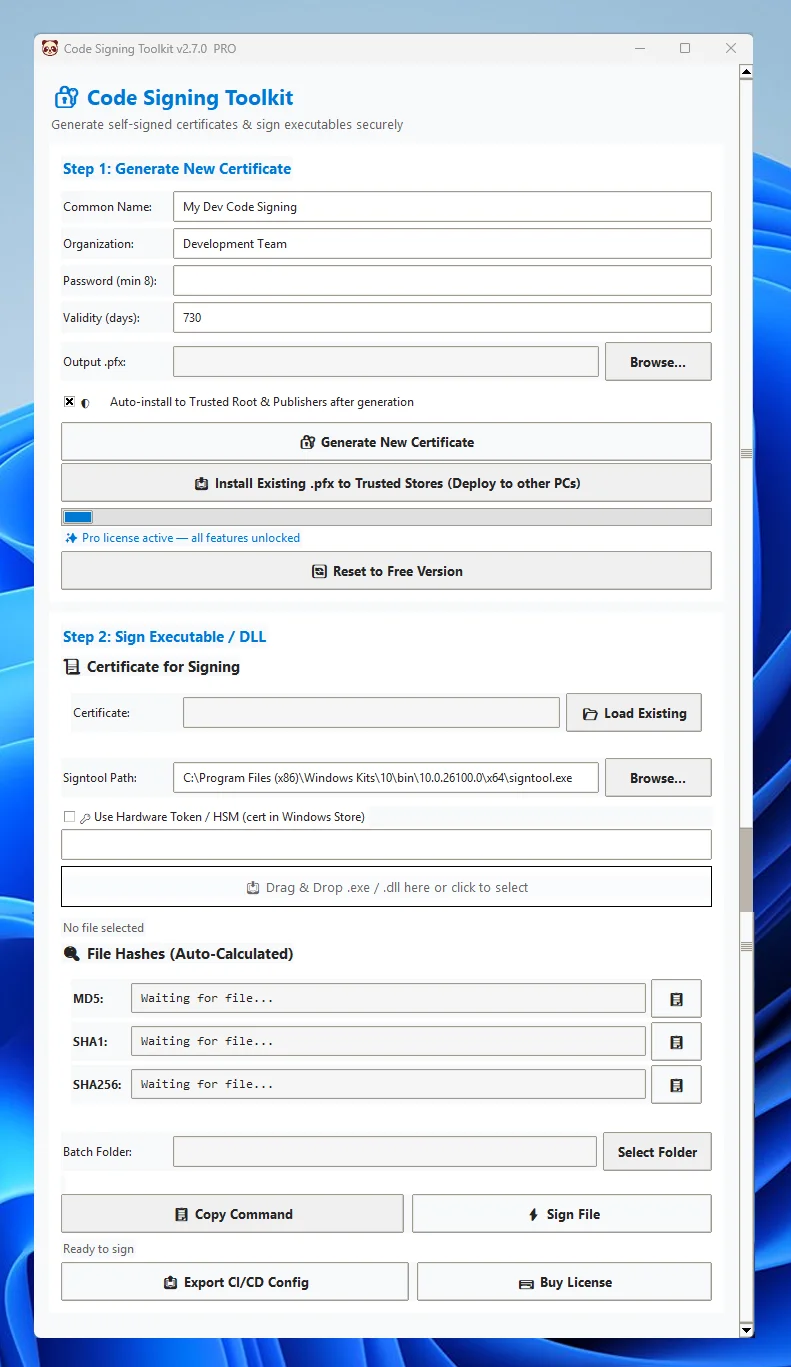
Code Signing Toolkit is a professional, offline-first Windows GUI that lets developers generate certificates, sign executables, and manage hardware-bound licenses in minutes. Built for speed, security, and zero cloud dependencies—perfect for indie devs, release engineers, and security-conscious teams.
✨ Key Features
🔹 Self-Signed Certificate Generator – Create 4096-bit RSA
🔹 Drag & Drop Code Signing – Sign
🔹 RFC 3161 Timestamping – Keep signatures valid beyond certificate expiration with trusted timestamp server integration.
🔹 Batch Signing & Folder Processing – (Pro) Sign entire directories at once. Ideal for release packages, plugin bundles, or multi-binary builds.
🔹 CI/CD Pipeline Export – Generate ready-to-use GitHub Actions or Azure DevOps YAML configs with pre-configured signing steps.
HSM & Hardware Token Support – Sign using certificates in Windows Certificate Store, YubiKey, SafeNet, or enterprise HSMs via SHA1 thumbprint mode.
Trusted Store Auto-Install – (Pro) Deploy certificates to Windows Trusted Root & Publishers stores with safe UAC elevation.
🔹 Offline & Private – No telemetry, no cloud APIs, no subscriptions. Your keys never leave your machine.
.pfx certificates instantly. Customize CN, Organization, and validity for internal testing.🔹 Drag & Drop Code Signing – Sign
.exe, .dll, .msi, and .ocx files with one click. Auto-detects signtool.exe from Windows SDK & Visual Studio.🔹 RFC 3161 Timestamping – Keep signatures valid beyond certificate expiration with trusted timestamp server integration.
🔹 Batch Signing & Folder Processing – (Pro) Sign entire directories at once. Ideal for release packages, plugin bundles, or multi-binary builds.
🔹 CI/CD Pipeline Export – Generate ready-to-use GitHub Actions or Azure DevOps YAML configs with pre-configured signing steps.
HSM & Hardware Token Support – Sign using certificates in Windows Certificate Store, YubiKey, SafeNet, or enterprise HSMs via SHA1 thumbprint mode.
Trusted Store Auto-Install – (Pro) Deploy certificates to Windows Trusted Root & Publishers stores with safe UAC elevation.
🔹 Offline & Private – No telemetry, no cloud APIs, no subscriptions. Your keys never leave your machine.
Who It’s For
- Indie Developers & Small Studios – Sign builds locally during development without expensive CA subscriptions.
- DevOps & Release Engineers – Automate signing with CI/CD exports and batch processing for nightly/staging builds.
- Enterprise Security Teams – Integrate with existing HSMs, enforce timestamping, and maintain offline audit trails.
- Plugin & Driver Publishers – Quickly sign
.dlland.sysfiles for internal distribution or QA environments.
⚙️ System Requirements
- Windows 10/11 (64-bit)
- Windows SDK 10+ or Visual Studio Build Tools (
signtool.exe) - Administrator rights (optional; required only for Trusted Store installation)
❓ Frequently Asked Questions (SEO Long-Tail Targets)
Q: Can I use Code Signing Toolkit for public software distribution?
A: The Free tier generates self-signed certificates for development and internal use only. Public distribution requires a certificate from a trusted CA (DigiCert, Sectigo, etc.). Pro users can export CA-ready pipelines and integrate hardware tokens for production signing.
Q: Does it work offline?
A: Yes. Code Signing Toolkit runs entirely locally. No telemetry, no cloud API calls, and no internet required for certificate generation or signing.
Q: How do I sign multiple DLLs or EXEs at once?
A: Use the Pro feature Batch Signing. Select a folder, and the toolkit will automatically locate and sign all supported binaries with RFC 3161 timestamping.
Q: Is it compatible with YubiKey or Smart Cards?
A: Absolutely. Toggle “Use Hardware Token / HSM” and enter your certificate’s SHA1 thumbprint. The app routes signing through Windows CryptoAPI/CNG providers.
💰 Pricing & Licensing
- Free Tier: Certificate generation, single-file signing, timestamping, HSM support. Perfect for development & educational use.
- Pro License ($29 one-time): Batch signing, CI/CD exports, trusted store auto-install, hardware-bound activation, priority support, commercial use rights.
- 🔐 Licenses are cryptographically bound to one machine. One free transfer allowed per 12 months.
📥 Download & Get Started
🚀 Download Free → Generate your first certificate and sign an executable in under 60 seconds.
🔓 Upgrade to Pro → Unlock batch signing, pipeline automation, and production-ready workflows.